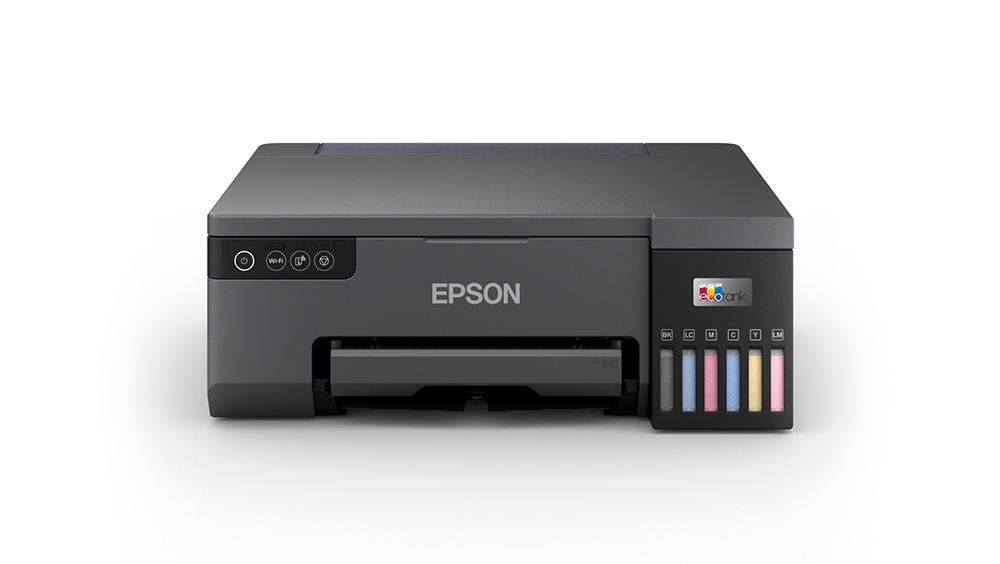
Finding a dedicated photo printer that combines lab-quality colour reproduction with ultra-low running costs is a common hurdle for professional photographers, creative studios, and small business owners. Standard four-colour desktop printers often fall short on subtle skin tones, smooth colour gradients, and shadow depth.
The Epson EcoTank L8050 is designed to address that gap. Equipped with a 6-colour dye-ink tank system, high-speed draft throughput, and seamless wireless connectivity, it offers a streamlined photo production platform in an ultra-compact desktop footprint. Below is a comprehensive look at how it performs, its primary strengths, and where its limitations lie.
Technical Specifications at a Glance
| Feature | Specification |
|---|---|
| Model | Epson EcoTank L8050 |
| Print Technology | On-demand inkjet (Piezoelectric) |
| Ink System | 6-Colour (Cyan, Magenta, Yellow, Black, Light Cyan, Light Magenta) |
| Maximum Resolution | Up to 5760 x 1440 dpi |
| Rated Print Speed | Up to 22 ppm (Draft, Black & Colour) |
| Connectivity | Wi-Fi, Wi-Fi Direct, USB 2.0 |
| Paper Capacity | 100-sheet rear paper tray (plain paper) / 20 sheets (photo paper) |
| Maximum Paper Size | A4 (8.3 x 11.7 in), Letter, Legal, 4×6, 5×7 |
| Power Consumption | Approx. 19 Watts (Operating) |
| Weight & Dimensions | 6.0 kg; 36.9 x 40.3 x 15.0 cm (D x W x H) |
| Warranty | 1 Year or 50,000 pages (whichever comes first) |
Key Features & Highlights
1. 6-Colour Dye Ink System for Natural Gradations
Unlike conventional entry-level ink tank models that rely on standard CMYK (4 inks), the L8050 integrates Light Cyan and Light Magenta alongside standard Cyan, Magenta, Yellow, and Black. These additional tones provide:
- Smooth skin tonal transitions without noticeable graininess.
- Richer, more expansive colour gamuts across landscapes and portraits.
- Clean highlight details and high-contrast shadows at resolutions up to 5760 x 1440 dpi.
2. Low Cost per Print
Epson’s continuous ink tank design eliminates traditional ink cartridges. Refilling uses keyed, spill-free ink bottles that fit only into their corresponding colour reservoir. For photo studios, ID-card printers, and wedding albums, the cost per print remains a fraction of cartridge-based alternatives.
3. Compact Design & Versatile Media Handling
Weighing just 6 kg and measuring under 15 cm in height, the L8050 fits comfortably on tight studio desks and workstations. The rear feed accommodates multiple media types, including standard plain paper, glossy/matte photo paper, envelopes, and direct printing onto compatible media such as PVC ID cards and CDs/DVDs via specialized trays.
4. Wireless Workflow Integration
Equipped with Wi-Fi and Wi-Fi Direct, the printer connects without requiring a direct tether to a computer. Photographers and operators can print directly from smartphones and tablets running Android or iOS using the Epson Smart Panel application, simplifying mobile workflow management.
Performance and Usability
Print Quality
The standout capability of the L8050 is its photographic output. On high-gloss and semi-gloss photographic papers, printouts show vivid saturation, accurate neutral tones, and deep blacks. The 48-bit colour processing reproduces delicate highlights that standard 4-ink setups frequently wash out.
Speed and Throughput
In draft document mode, the printer reaches speeds up to 22 pages per minute (ppm) in monochrome and colour. Full-resolution, borderless A4 photographic prints naturally take longer, but output times remain balanced for mid-volume studio batches.
Ease of Maintenance
The L8050 features an easily accessible, user-replaceable maintenance box (waste ink box) and pick-up roller design, keeping routine maintenance straightforward and minimizing field service downtime.
Pros & Cons
Pros
- Superb Photographic Fidelity: Dedicated Light Cyan and Light Magenta deliver lab-grade photo prints.
- Economical Running Costs: High-yield ink bottles substantially reduce per-print overhead.
- Compact, Low-Profile Footprint: Space-efficient layout with front-facing ink reservoirs for visual ink monitoring.
- Flexible Wireless Support: Operates over Wi-Fi, Wi-Fi Direct, and USB 2.0 with full smartphone compatibility.
- Replaceable Wear Parts: Field-replaceable maintenance box prevents unnecessary service visits.
Cons
- Print-Only Architecture: Lacks an integrated flatbed scanner/copier (requires a dedicated scanner for digitizing documents).
- Manual Duplexing: Does not include an automatic duplexer for double-sided documents.
- Dye-Based Inks: Plain-paper text prints lack the water resistance and crispness of pigment-black inks.
Final Verdict: Is the Epson EcoTank L8050 Worth It?
The Epson EcoTank L8050 is an excellent choice for photography enthusiasts, wedding studios, graphic designers, and commercial print shops requiring reliable, high-fidelity A4 photo output on a reasonable budget. While its single-function (print-only) design means general office users needing copying or scanning should look elsewhere, its combination of 6-colour photo rendering, flexible media support, and minimal running costs makes it one of the top value-for-money photo tank printers in its class.